§ 01 — Computer Programming 1
Lesson 1: Programming Concepts
01
What Is a Computer?
A computer is an electronic device that accepts data from the user, processes it, produces results, and stores those results for future use. Data is raw, unorganized facts; information is data that has been processed into something meaningful.
Hardware and Software
Hardware refers to the physical, mechanical parts of a computer — the devices you can touch. This includes the CPU, keyboard, mouse, hard drive, and other components.
Software is the set of instructions that drives the computer to perform tasks. Software falls into two categories:
- System software — operates directly on the hardware (e.g., Windows, Linux, Unix).
- Application software — designed to help users perform specific tasks (e.g., word processors, spreadsheets).
Programs and Programming
A program is the ordered set of instructions a computer follows to process data into information. Writing that set of instructions is called programming.
The five-step programming process:
- Define the problem — understand what needs to be solved. Specify objectives, identify users, define inputs and outputs, and assess feasibility.
- Design the solution — plan the logic using tools like hierarchy charts, flowcharts, or pseudocode.
- Code the program — translate the design into a specific programming language.
- Test the program — desk check, debug, and run with real data to confirm correctness.
- Document the program — write user, operator, and programmer documentation.
Types of errors:
- Syntax errors — incorrect formatting, caught during compilation.
- Logic errors — code runs but produces wrong results due to faulty reasoning.
02
Program Logic Formulation
Before writing code, plan the logic. Two common tools: flowcharts and pseudocode.
Flowcharts
A flowchart is a visual representation of a solution using standardized shapes connected by arrows.
| Symbol | Name | Purpose |
|---|---|---|
| Oval | Terminal | Marks start or stop |
| Parallelogram | Input/Output | User input or output of results |
| Rectangle | Process | Computation or data manipulation |
| Diamond | Decision | Condition — TRUE or FALSE paths |
| Arrow | Flow Line | Direction of execution |
| Circle | Connector | Connects parts across pages |
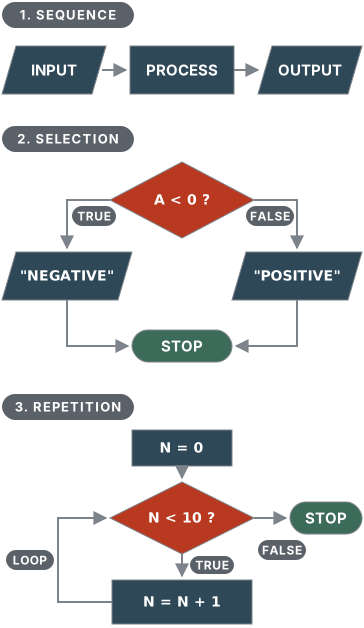
Three fundamental control structures:
1. Sequential — steps execute one after another in order.
START → Initialize → INPUT → PROCESS → OUTPUT → STOP
2. Selection — a decision point where one of two paths is taken.
START → INPUT A
  IF A < 0 → OUTPUT "NEGATIVE"
  ELSE IF A == 0 → OUTPUT "INVALID"
  ELSE → OUTPUT "POSITIVE"
STOP
3. Repetition — steps are repeated until a condition is met.
START → N=0
  LOOP while N < 10:
    N = N + 1
    IF N is odd: OUTPUT N
STOP
These three structures — sequence, selection, repetition — are sufficient to construct any program logic.
The three structures as flowcharts:
#include <stdio.h>

int main() {
    char name[] = "BSIT";
    printf("Hello, %s!\n", name);
    return 0;
}
03
Algorithms (Pseudocode)
An algorithm is a step-by-step description of a solution written in structured English-like language. Also called pseudocode.
Common pseudocode conventions:
- Arithmetic:
+,-,*,/ - Assignment:
→(arrow pointing to the variable) - Input:
INPUTorREAD - Output:
OUTPUT,PRINT, orDISPLAY - Indentation shows grouping of related steps
Sequential example — sum of two numbers:
ALGORITHM sum
  A → 0, B → 0, SUM → 0
  INPUT A, B
  SUM → A + B
  OUTPUT SUM
END sum
Sequential example — product of three numbers:
ALGORITHM product
  A → 0, B → 0, C → 0, PRODUCT → 0
  INPUT A, B, C
  PRODUCT → A * B * C
  OUTPUT PRODUCT
END product
Selection example — positive or negative number:
ALGORITHM pos_neg
  N → 0
  INPUT N
  IF N < 0 THEN
    OUTPUT "NEGATIVE"
  END IF
  IF N == 0 THEN
    OUTPUT "INVALID"
  ELSE
    OUTPUT "POSITIVE"
  END IF
END pos_neg
04
Key Takeaways
- A program is an ordered set of instructions that turns data (raw facts) into information. Writing those instructions is programming.
- Work through the five steps in order: define the problem, design the solution, code it, test it, then document it.
- Plan before you code. A flowchart draws the logic with standard shapes (oval for start/stop, parallelogram for input/output, rectangle for a process, diamond for a decision). Pseudocode writes the same steps in plain English.
- Any program logic can be built from three structures: sequence, selection, and repetition.
- A syntax error breaks the rules of the language and is caught when compiling. A logic error runs fine but gives the wrong answer.
Quick check
Did it stick?
2 questions from the notes above. Answering beats rereading.
05
Practice Exercises — Lesson 1
Review questions (write answers in your own words):
- Differentiate hardware and software.
- Differentiate program and programming.
- What are the components of hardware?
- What are the five steps of programming?
- What is the difference between a syntax error and a logic error?
Algorithm exercises — write a flowchart AND pseudocode for each:
-
The volume of a rectangular box is V = length × width × height. Design an algorithm that takes the three dimensions and displays the volume.
-
Design an algorithm that converts hours to minutes. Output: "3 hours is equal to 180 minutes."
-
Given three numbers a, b, and c, design an algorithm that computes their sum, difference, product, quotient, and sum of their squares.
-
A store sells four candy types: Type A ₱35/kg, Type B ₱45/kg, Type C ₱56/kg, Type D ₱57.50/kg. Design an algorithm to calculate total cost from the weight of each type purchased.
-
On Mars, a 100-pound Earth person weighs 38 pounds. On Jupiter, 264 pounds. Design an algorithm that takes Earth weight and displays Mars and Jupiter weight.
Free sample
06
Worked Exam Solutions + How-to-Pass Tips — Lesson 1
Answer Key — Review Questions
- Hardware vs. software: Hardware is the physical, touchable part of the computer (CPU, keyboard, monitor); software is the set of instructions that tells the hardware what to do. One sentence to memorize: hardware is the body, software is the mind.
- Program vs. programming: A program is the product — the ordered set of instructions the computer follows. Programming is the process — writing, testing, and refining those instructions.
- Components of hardware: input devices (keyboard, mouse), the CPU (control unit + arithmetic/logic unit), memory and storage (RAM, hard drive), and output devices (monitor, printer).
- Five steps of programming: (1) define the problem, (2) design the solution, (3) code the program, (4) test the program, (5) document the program. Exams love asking these in order — memorize the sequence, not just the list.
- Syntax vs. logic error: a syntax error breaks the language rules and is caught by the compiler before the program runs; a logic error compiles and runs but produces wrong results (e.g., using
+where you meant*). Compiler catches syntax; only testing catches logic.
Answer Key — Algorithm Exercises (pseudocode)
- Volume of a box:
ALGORITHM volume
  INPUT LENGTH, WIDTH, HEIGHT
  V → LENGTH * WIDTH * HEIGHT
  OUTPUT V
END volume
- Hours to minutes:
ALGORITHM hours_to_minutes
  INPUT HOURS
  MINUTES → HOURS * 60
  OUTPUT HOURS, " hours is equal to ", MINUTES, " minutes."
END hours_to_minutes
- Five results from a, b, c:
ALGORITHM five_results
  INPUT A, B, C
  SUM → A + B + C
  DIFF → A - B - C
  PROD → A * B * C
  QUOT → A / B / C
  SUMSQ → A*A + B*B + C*C
  OUTPUT SUM, DIFF, PROD, QUOT, SUMSQ
END five_results
- Candy store:
ALGORITHM candy_cost
  INPUT WA, WB, WC, WD          (kilos of each type)
  TOTAL → WA*35 + WB*45 + WC*56 + WD*57.50
  OUTPUT TOTAL
END candy_cost
Worked Exam-Style Problem
Problem: (Exercise 5) A 100-pound Earth person weighs 38 pounds on Mars and 264 pounds on Jupiter. Design the algorithm.
Solution: Step 1: Find the conversion factors — Mars: 38/100 = 0.38, Jupiter: 264/100 = 2.64. Stating this derivation is what separates a full-credit answer from a lucky guess. Step 2: Identify input (Earth weight E) and outputs (Mars weight M, Jupiter weight J). Step 3: Write the pseudocode:
ALGORITHM planet_weight
  INPUT E
  M → E * 0.38
  J → E * 2.64
  OUTPUT M, J
END planet_weight
Step 4: For the flowchart, draw: oval START → parallelogram INPUT E → rectangle M = E * 0.38 → rectangle J = E * 2.64 → parallelogram OUTPUT M, J → oval STOP. Step 5: Desk-check with the given data: E = 100 → M = 38, J = 264 ✓ — always desk-check with the numbers the problem itself gives you.
How to Pass Tips
- Flowchart symbol questions are free points: oval = start/stop, parallelogram = input/output, rectangle = process, diamond = decision. Draw them correctly — wrong shapes lose marks even when the logic is right.
- Every algorithm needs INPUT, PROCESS, and OUTPUT. If your pseudocode is missing one of the three, you dropped a step.
- Desk-check every answer with easy numbers before moving on; it takes 30 seconds and catches most logic slips.
- When a problem states a sample ("100 pounds → 38 pounds"), the conversion factor is hiding in that sentence — divide to find it.
Free sample
07
Code Lab — Lesson 1: Run It Yourself
Coding Drill: This is Exercise 1 (volume of a box) translated from pseudocode into a real C program. Complete the TODO line, then press Run — you are compiling actual C in your browser, no installation needed.
Expected output:
Volume: 60
#include <stdio.h>

int main(void) {
    int length = 5, width = 4, height = 3;
    int volume = 0;

    /* TODO: compute the volume (V = length x width x height) */

    printf("Volume: %d\n", volume);
    return 0;
}
Free Sample
That was the free sample: 3 of 29 reviewers with answer keys in Computer Programming 1. Unlock the rest for the semester.
Unlock all reviewers →Done with this module? Track it — your progress shows on the subject list.
Studying with blockmates? Send them this lesson.
Up next
Lesson 2: Introduction to C→