§ 01 — Computer Programming 1
Lesson 2: Introduction to C
01
What Is C?
C is a general-purpose, structured programming language known for efficiency and close-to-hardware control. It uses economy of expression, modern control structures, and a rich set of operations. Often called a "systems programming language" because it is well-suited for writing operating systems and compilers.
Brief History
- BCPL — developed by Martin Richards in 1967; influenced B.
- B — created by Ken Thompson in 1970 for early UNIX on the DEC PDP-7; typeless (no data types).
- C — designed by Dennis Ritchie in 1972 at AT&T Bell Laboratories; expanded B by adding data types.
- Turbo C — developed by Borland International in 1987 for MS-DOS.
Key Definitions
- Interpreter — reads and executes source code one line at a time.
- Compiler — reads the entire program and converts it to object code.
- Compile time — when compilation happens; syntax errors are caught here.
- Object code — machine-language translation of source code; also called binary or machine code.
- Source code — the human-readable text of a program.
- Run time — when the compiled program executes; run-time (semantic) errors appear here.
- Library — a collection of pre-written functions available for use in programs.
02
The Compilation Process
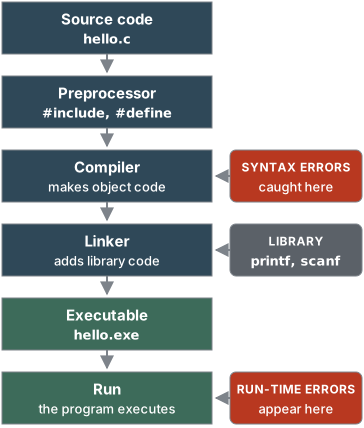
When you write a C program and want to run it, it goes through these stages:
Source code (.c file)
      ↓
  Preprocessor   ← handles #include, #define directives
      ↓
  Compiler       ← converts to object code; catches syntax errors
      ↓
  Object code
      ↓
  Linker         ← combines object code with library code
      ↓
  Executable code
The same pipeline, showing where each kind of error shows up:
03
Identifiers
An identifier is a name used to reference a variable, function, or other user-defined element.
Rules for naming identifiers in C:
- The first character must be a letter or underscore (
_). - Subsequent characters can be letters, digits, or underscores.
- Spaces and hyphens are not allowed.
- The first 63 characters are significant.
- C is case-sensitive:
Sname,SNAME, andsnameare three different identifiers. - An identifier cannot be the same as a C keyword (e.g.,
int,float,if,while).
04
Data Types
C provides several fundamental (scalar) data types:
| Type | Size | Range | Use |
|---|---|---|---|
short int | 2 bytes | −32,768 to +32,767 | Small integers |
int | 4 bytes | −2,147,483,648 to +2,147,483,647 | General integers |
long int | 4 bytes | Same as int | Large integers |
unsigned int | 2–4 bytes | 0 to 65,535+ | Non-negative integers |
float | 4 bytes | ≈ 3.4E−38 to 3.4E+38 | Decimal numbers |
double | 8 bytes | ≈ 1.7E−308 to 1.7E+308 | Higher-precision decimals |
char | 1 byte | −128 to +127 | Single characters |
void | — | — | No value (functions returning nothing) |
05
Variables and Constants
Variables
A variable is an identifier that holds a value which can change during program execution.
Declaration syntax:
data_type variable1, variable2;
Examples:
int x, y, z;
char a, b;
double s;
float ave;
char Sname[30];
Initializing Variables
Variables contain garbage values until explicitly assigned. Three ways:
1. Assignment statement:
x = -1;
ch1 = 'A';
2. Using scanf:
scanf("%d", &x);
3. At declaration:
int x = 3;
char y = 'x';
double a, b = 100.00;
Global vs. Local Variables
- Global variables — declared outside all functions; accessible throughout the program; initialized to zero if unspecified.
- Local variables — declared inside a function; accessible only within that function; must be explicitly initialized.
Constants
| Type | Example |
|---|---|
| Character constant | 'a', 'P' |
| Integer constant | 10, -100 |
| Floating-point | 11.123 |
| String constant | "hello" |
#define | #define PI 3.14159 |
const modifier | const float version = 3.20; |
06
Operators
Arithmetic Operators
| Operator | Operation |
|---|---|
* | Multiplication |
/ | Division |
+ | Addition |
- | Subtraction |
% | Modulus (remainder) — integers only |
++ | Increment (add 1) |
-- | Decrement (subtract 1) |
Important: Integer division truncates: 11/2 = 5. Modulus gives remainder: 11 % 2 = 1.
Prefix vs. postfix increment:
x = 10;
y = ++x;   // x becomes 11 first, then y = 11
x = 10;
y = x++;   // y = 10 first, then x becomes 11
Shorthand operators:
x += y;   // x = x + y
x -= y;   // x = x - y
x *= y;   // x = x * y
x /= y;   // x = x / y
x %= y;   // x = x % y
Relational Operators
| Operator | Meaning |
|---|---|
> | Greater than |
< | Less than |
>= | Greater than or equal to |
<= | Less than or equal to |
== | Equal to |
!= | Not equal to |
Logical Operators
| Operator | Meaning |
|---|---|
&& | AND |
|| | OR |
! | NOT |
In C, true = any non-zero value, false = 0.
Ternary Operator
expression1 ? expression2 : expression3;
If expression1 is true, result is expression2; otherwise expression3.
Operator Precedence (highest to lowest)
! ++ --           (unary)
* / %
+ -
< <= > >=
== !=
&&
||
? :
= += -= *= /=
07
Key Takeaways
- C is a general-purpose, structured language designed by Dennis Ritchie in 1972 at AT&T Bell Laboratories.
- Your
.csource code passes through the preprocessor, the compiler, and the linker to become an executable. Syntax errors show up at compile time; run-time errors only show up when the program runs. - An identifier starts with a letter or underscore, cannot be a keyword, and is case-sensitive:
sumandSumare two different names. - Pick the type that fits the value:
intfor whole numbers,floatordoublefor decimals,charfor one character. A variable holds a garbage value until you give it one. - Know the classic traps:
11 / 2is5(integer division),11 % 2is1, andy = x++copiesxbefore adding 1, whiley = ++xadds 1 first.
08
Try It: C Basics
Run the code below. Try changing the values and adding more variables.
#include <stdio.h>

int main(void) {
    int age = 20;
    float gpa = 1.75;
    char grade = 'A';

    printf("Age: %d\n", age);
    printf("GPA: %.2f\n", gpa);
    printf("Grade: %c\n", grade);

    return 0;
}
Quick check
Did it stick?
2 questions from the notes above. Answering beats rereading.
Pro3 reviewers locked
Part of this subject's paid reviewers. Not included in this printout.
- 09Practice Exercises — Lesson 2
- 10Worked Exam Solutions + How-to-Pass Tips — Lesson 2
- 11Code Lab — Lesson 2: Fix the Five Errors
Done with this module? Track it — your progress shows on the subject list.
Studying with blockmates? Send them this lesson.
Up next
Lesson 3: Input/Output and Program Structure→←Previous: Lesson 1: Programming Concepts