§ 01 — Computer Programming 2
Lesson 7: Searching and Sorting
01
Linear Search
Searching means finding where a value (the key) sits in an array, or finding out that it is not there. Sorting means putting the elements in order. They go together: a sorted array can be searched much faster, as the next section shows.
The idea
Linear search (also called sequential search) is what you do when you look for your name on a class list that is not in alphabetical order: start at the top and check each entry, one by one, until you find it or run out of list.
#include <stdio.h>

int linearSearch(int a[], int n, int key) {
    int i;
    for (i = 0; i < n; i++) {
        if (a[i] == key)
            return i;          /* found: give back its index */
    }
    return -1;                 /* checked everything: not there */
}

int main(void) {
    int a[] = {29, 10, 14, 37, 13};
    printf("%d\n", linearSearch(a, 5, 37));
    printf("%d\n", linearSearch(a, 5, 50));
    return 0;
}
Output:
3
-1
The function returns the index where the key was found. It returns -1 when the key is missing, because -1 can never be a real index. The caller must check for -1 before using the result as an index.
Trace: searching for 37 in {29, 10, 14, 37, 13}
| i | a[i] | a[i] == 37? |
|---|---|---|
| 0 | 29 | no |
| 1 | 10 | no |
| 2 | 14 | no |
| 3 | 37 | yes, return 3 |
Four comparisons. Searching for 50 checks all five elements, finds nothing, and returns -1 after five comparisons.
How fast is it?
- Best case: the key is the first element. 1 comparison.
- Worst case: the key is last, or missing. n comparisons for n elements.
So the work grows in step with the size of the array: twice the elements, twice the comparisons in the worst case.
When to use it
- The array is not sorted. Linear search is the only choice that works on any order.
- The array is small, or you search it only once.
Common mistakes
- Putting
return -1;inside the loop (in anelse). Then the function gives up after checking onlya[0]. - Looping with
i <= n, which readsa[n], one past the end of the array.
02
Binary Search
Binary search is how you look up a word in a dictionary. You do not start at page 1. You open near the middle, see whether your word comes before or after that page, and throw away the half that cannot contain it. Then you repeat with the half that is left.
That trick only works because a dictionary is in order. Binary search has the same rule: the array must be sorted first. On an unsorted array it can miss values that are there.
#include <stdio.h>

int binarySearch(int a[], int n, int key) {
    int low = 0, high = n - 1, mid;
    while (low <= high) {
        mid = low + (high - low) / 2;
        if (a[mid] == key)
            return mid;            /* found */
        else if (a[mid] < key)
            low = mid + 1;         /* key is in the right half */
        else
            high = mid - 1;        /* key is in the left half */
    }
    return -1;                     /* low passed high: not there */
}

int main(void) {
    int a[] = {3, 8, 15, 21, 27, 34, 42, 56, 61, 70};
    printf("%d\n", binarySearch(a, 10, 15));
    printf("%d\n", binarySearch(a, 10, 40));
    return 0;
}
Output:
2
-1
low and high mark the part of the array that could still hold the key. Each pass looks at the middle element, mid, and either finds the key or moves low or high past mid, cutting the range in half. When low passes high, the range is empty and the key is not there.
mid = low + (high - low) / 2 gives the same answer as (low + high) / 2 for normal sizes. Integer division drops the .5, so the middle of 0 and 9 is 4. The longer form just avoids overflow when low + high is bigger than an int can hold.
Trace: searching for 15
The array, with its indexes:
| index | 0 | 1 | 2 | 3 | 4 | 5 | 6 | 7 | 8 | 9 |
|---|---|---|---|---|---|---|---|---|---|---|
| value | 3 | 8 | 15 | 21 | 27 | 34 | 42 | 56 | 61 | 70 |
| Step | low | high | mid | a[mid] | Decision |
|---|---|---|---|---|---|
| 1 | 0 | 9 | 4 | 27 | 27 > 15, so high = 3 |
| 2 | 0 | 3 | 1 | 8 | 8 < 15, so low = 2 |
| 3 | 2 | 3 | 2 | 15 | found, return 2 |
Trace: searching for 40 (not in the array)
| Step | low | high | mid | a[mid] | Decision |
|---|---|---|---|---|---|
| 1 | 0 | 9 | 4 | 27 | 27 < 40, so low = 5 |
| 2 | 5 | 9 | 7 | 56 | 56 > 40, so high = 6 |
| 3 | 5 | 6 | 5 | 34 | 34 < 40, so low = 6 |
| 4 | 6 | 6 | 6 | 42 | 42 > 40, so high = 5 |
| 6 | 5 | low > high, return -1 |
Four comparisons to prove 40 is missing. Linear search would have needed all ten.
How fast is it?
Every step halves what is left, so the number of steps is how many times you can halve n before reaching 1:
| Elements | Linear search, worst | Binary search, worst |
|---|---|---|
| 10 | 10 | 4 |
| 1,000 | 1,000 | 10 |
| 1,000,000 | 1,000,000 | 20 |
Binary search with recursion
Binary search is the "split in half" kind of problem from Lesson 6 (Recursion). The range shrinks every call, and there are two base cases: the range is empty, or the middle is the key.
int binarySearchRec(int a[], int low, int high, int key) {
    int mid;
    if (low > high)                  /* base case 1: empty range */
        return -1;
    mid = low + (high - low) / 2;
    if (a[mid] == key)               /* base case 2: found */
        return mid;
    if (a[mid] < key)
        return binarySearchRec(a, mid + 1, high, key);
    return binarySearchRec(a, low, mid - 1, key);
}
Calling binarySearchRec(a, 0, 9, 61) on the same array returns 8.
Common mistakes
- Using binary search on an unsorted array.
- Writing
while (low < high), which stops one step early and misses the key when it is the last element left. - Writing
low = midorhigh = midinstead ofmid + 1andmid - 1. The range can stop shrinking and the loop never ends.
03
Bubble Sort
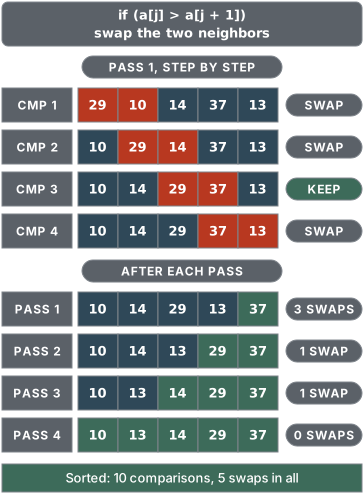
Bubble sort walks through the array comparing each pair of neighbors, and swaps them when they are out of order. After one full pass the largest value has "bubbled up" to the last position. Repeat, and the next largest settles just before it, and so on.
#include <stdio.h>

void bubbleSort(int a[], int n) {
    int i, j, temp, swapped;
    for (i = 0; i < n - 1; i++) {          /* one pass per i */
        swapped = 0;
        for (j = 0; j < n - 1 - i; j++) {  /* the last i are already in place */
            if (a[j] > a[j + 1]) {         /* neighbors out of order: swap */
                temp = a[j];
                a[j] = a[j + 1];
                a[j + 1] = temp;
                swapped = 1;
            }
        }
        if (!swapped)                      /* a pass with no swaps: done */
            break;
    }
}

int main(void) {
    int a[] = {29, 10, 14, 37, 13};
    int i;
    bubbleSort(a, 5);
    for (i = 0; i < 5; i++)
        printf("%d ", a[i]);
    printf("\n");
    return 0;
}
Output:
10 13 14 29 37
Pass 1, comparison by comparison
Start: 29 10 14 37 13
| Compare | Out of order? | Array after |
|---|---|---|
| 29 and 10 | yes, swap | 10 29 14 37 13 |
| 29 and 14 | yes, swap | 10 14 29 37 13 |
| 29 and 37 | no | 10 14 29 37 13 |
| 37 and 13 | yes, swap | 10 14 29 13 37 |
37, the largest, is now in its final place.
Every pass
| Pass | Comparisons | Array after the pass |
|---|---|---|
| 1 | 4 | 10 14 29 13 37 |
| 2 | 3 | 10 14 13 29 37 |
| 3 | 2 | 10 13 14 29 37 |
| 4 | 1 | 10 13 14 29 37 |
Bold marks the sorted end of the array: each pass locks one more value into place there, and the last pass locks in the first two together. Each pass compares one pair fewer, because the inner loop stops at n - 1 - i: the end of the array is already sorted. In total: 10 comparisons and 5 swaps.
The swapped flag
If a whole pass makes no swaps, every neighbor is already in order, so the array is sorted and the loop can stop early. On an already sorted array like 1 2 3 4 5 the flag ends bubble sort after one pass of 4 comparisons. Without the flag, it would still run all 4 passes.
Common mistakes
- Running the inner loop to
j < ninstead ofj < n - 1 - i. Thena[j + 1]reads past the end of the array. - Swapping without a temporary variable:
a[j] = a[j + 1]; a[j + 1] = a[j];copies the same value into both places. - Resetting
swapped = 0outside the outer loop instead of at the start of every pass.
04
Selection Sort and Insertion Sort
Selection sort: find the smallest, put it in front
Selection sort splits the array into a sorted part (on the left, empty at first) and an unsorted part. Each pass scans the unsorted part for its smallest value and swaps it into the first unsorted position.
void selectionSort(int a[], int n) {
    int i, j, min, temp;
    for (i = 0; i < n - 1; i++) {
        min = i;                           /* assume a[i] is the smallest */
        for (j = i + 1; j < n; j++) {      /* scan the unsorted part */
            if (a[j] < a[min])
                min = j;                   /* remember where the smallest is */
        }
        if (min != i) {                    /* one swap per pass, at most */
            temp = a[i];
            a[i] = a[min];
            a[min] = temp;
        }
    }
}
Same starting array, 29 10 14 37 13:
| Pass | Smallest in the unsorted part | Swap | Array after |
|---|---|---|---|
| 1 | 10 (index 1) | a[0] with a[1] | 10 29 14 37 13 |
| 2 | 13 (index 4) | a[1] with a[4] | 10 13 14 37 29 |
| 3 | 14 (index 2) | none, already there | 10 13 14 37 29 |
| 4 | 29 (index 4) | a[3] with a[4] | 10 13 14 29 37 |
10 comparisons and only 3 swaps. Selection sort always makes the same number of comparisons whatever the order, but at most one swap per pass. That makes it a good choice when swapping is expensive, such as large records.
Insertion sort: like arranging cards in your hand
Insertion sort also keeps a sorted part on the left. Each pass picks up the next value (the key), shifts every bigger value in the sorted part one place to the right, and drops the key into the gap. It is how most people sort a hand of playing cards.
void insertionSort(int a[], int n) {
    int i, j, key;
    for (i = 1; i < n; i++) {
        key = a[i];                        /* the card being inserted */
        j = i - 1;
        while (j >= 0 && a[j] > key) {     /* shift bigger values right */
            a[j + 1] = a[j];
            j--;
        }
        a[j + 1] = key;                    /* drop key into the gap */
    }
}
Same starting array:
| Pass | Key | Shifted right | Array after |
|---|---|---|---|
| 1 | 10 | 29 | 10 29 14 37 13 |
| 2 | 14 | 29 | 10 14 29 37 13 |
| 3 | 37 | nothing | 10 14 29 37 13 |
| 4 | 13 | 37, 29, 14 | 10 13 14 29 37 |
Bold is the sorted part. In pass 3, 37 is already bigger than everything before it, so one comparison is enough and nothing moves. In total: 8 comparisons and 5 shifts.
Insertion sort is fast when the array is almost sorted: each key only moves a step or two. On 1 2 3 4 5 it makes just 4 comparisons and moves nothing.
Telling the three apart in an exam
A trace question often shows the array after each pass and asks which sort produced it. Look at pass 1:
- Bubble: the largest value is now at the end.
- Selection: the smallest value is now at the front, swapped with whatever was there.
- Insertion: only the first two elements are in order; the rest has not been touched.
Common mistakes
- Selection sort: swapping inside the inner loop every time a smaller value turns up. That is extra swaps, and no longer selection sort.
- Insertion sort: writing
a[j] > a[i]in thewhile.a[i]gets overwritten by the first shift, which is why the key is saved inkeyfirst. - Insertion sort: checking
a[j] > keybeforej >= 0. The order matters:j >= 0 && a[j] > keystops before readinga[-1].
05
Sorting an Array of Structs by a Field
In real programs you rarely sort bare numbers. You sort records: students by GWA, products by price, names A to Z. With the structures from Lesson 4 (Structures), the sorting algorithm stays exactly the same. Only two lines change:
- Compare one field, such as
s[j].gwa < s[min].gwa. - Swap the whole struct, using a temporary variable of the struct type.
#include <stdio.h>
#include <string.h>

struct Student {
    char name[20];
    float gwa;
};

/* Selection sort by GWA, lowest (best) first */
void sortByGwa(struct Student s[], int n) {
    int i, j, min;
    struct Student temp;
    for (i = 0; i < n - 1; i++) {
        min = i;
        for (j = i + 1; j < n; j++) {
            if (s[j].gwa < s[min].gwa)      /* compare ONE field... */
                min = j;
        }
        if (min != i) {
            temp = s[i];                     /* ...but swap the WHOLE struct */
            s[i] = s[min];
            s[min] = temp;
        }
    }
}

/* Bubble sort by name, A to Z */
void sortByName(struct Student s[], int n) {
    int i, j;
    struct Student temp;
    for (i = 0; i < n - 1; i++) {
        for (j = 0; j < n - 1 - i; j++) {
            if (strcmp(s[j].name, s[j + 1].name) > 0) {
                temp = s[j];
                s[j] = s[j + 1];
                s[j + 1] = temp;
            }
        }
    }
}

void printAll(struct Student s[], int n) {
    int i;
    for (i = 0; i < n; i++)
        printf("%-10s %.2f\n", s[i].name, s[i].gwa);
}

int main(void) {
    struct Student s[4] = {
        {"Santos", 1.75f}, {"Reyes", 1.25f},
        {"Cruz", 2.00f},   {"Bautista", 1.50f}
    };

    sortByGwa(s, 4);
    printf("By GWA:\n");
    printAll(s, 4);

    sortByName(s, 4);
    printf("By name:\n");
    printAll(s, 4);
    return 0;
}
Output:
By GWA:
Reyes      1.25
Bautista   1.50
Santos     1.75
Cruz       2.00
By name:
Bautista   1.50
Cruz       2.00
Reyes      1.25
Santos     1.75
A few things to notice:
- In the Philippine grading system a lower GWA is better, so sorting from lowest to highest lists the best student first. To sort the other way, flip
<to>. temp = s[i];copies a whole struct in one assignment, name and GWA together. C allows=between structs of the same type, even though it does not allow it between arrays.- Strings cannot be compared with
<or>. Usestrcmp()from<string.h>(Lesson 2, Strings): it returns a positive number when the first string comes after the second alphabetically, which is exactly when the pair is out of order.
Common mistake: swapping only the field
temp_gwa = s[i].gwa;        /* WRONG */
s[i].gwa = s[min].gwa;
s[min].gwa = temp_gwa;
The GWAs end up sorted, but the names stay where they were, so every grade is now attached to the wrong student. Always move the whole record.
Ties
When two records have the same key (two students with a 1.50 GWA), bubble sort and insertion sort keep them in their original order, because they only move a record past a strictly bigger one. Sorts that do this are called stable. Selection sort as written here is not: its long-distance swap can jump one record over an equal one.
06
Comparing the Algorithms: Big-O in Plain Words
Saying "bubble sort took 0.2 seconds" is not very useful: the same code runs at a different speed on every computer. Instead, programmers describe how the work grows as the input grows. That is what Big-O notation says.
You read O(n) as "order n". In plain words:
| Big-O | Plain words | Example |
|---|---|---|
| O(1) | the same work no matter how big n is | reading a[5] |
| O(log n) | the work goes up by one step each time n doubles | binary search |
| O(n) | double n, double the work | linear search |
| O(n²) | double n, four times the work | bubble, selection, insertion sort |
Rough step counts as n grows:
| n | O(log n) | O(n) | O(n²) |
|---|---|---|---|
| 10 | about 3 | 10 | 100 |
| 1,000 | about 10 | 1,000 | 1,000,000 |
| 1,000,000 | about 20 | 1,000,000 | 1,000,000,000,000 |
Big-O ignores small details, such as whether a sort makes n² or n²/2 comparisons. It only cares about the shape of the growth, because for large n the shape is what decides whether a program finishes in a blink or in hours.
Where does n² come from?
All three sorts have a loop inside a loop. For 5 elements, bubble and selection sort make 4 + 3 + 2 + 1 = 10 comparisons. For n elements, that is n(n - 1) / 2, about half of n². Half of n² still grows like n², so the class is O(n²).
The lesson's algorithms side by side
| Algorithm | Best case | Worst case | Good to know |
|---|---|---|---|
| Linear search | O(1) | O(n) | works on unsorted data |
| Binary search | O(1) | O(log n) | the array must be sorted |
| Bubble sort (with flag) | O(n) | O(n²) | many swaps; best case only with the flag |
| Selection sort | O(n²) | O(n²) | at most n - 1 swaps |
| Insertion sort | O(n) | O(n²) | fastest of the three on nearly sorted data |
Real counts from the traces in this lesson, all on 5 elements:
| Input | Bubble | Selection | Insertion |
|---|---|---|---|
| 29 10 14 37 13 | 10 comparisons, 5 swaps | 10 comparisons, 3 swaps | 8 comparisons, 5 shifts |
| 1 2 3 4 5 (sorted) | 4 comparisons, 0 swaps | 10 comparisons, 0 swaps | 4 comparisons, 0 shifts |
| 5 4 3 2 1 (reversed) | 10 comparisons, 10 swaps | 10 comparisons, 2 swaps | 10 comparisons, 10 shifts |
Which one should you use?
- Searching once in unsorted data: linear search. Sorting first just to search once costs more than it saves.
- Searching many times: sort once, then use binary search every time.
- Small or nearly sorted arrays: insertion sort.
- Swaps are expensive (big structs): selection sort.
- Large arrays: none of these three. Faster sorts such as merge sort and quick sort run in O(n log n) and come up in Data Structures and Algorithms. The C library also has
qsort()in<stdlib.h>.
07
Key Takeaways
- Linear search checks elements one by one and works on any array: up to n comparisons. Binary search halves the range each step, so it needs only about 20 comparisons for a million elements, but the array must be sorted.
- Bubble sort swaps neighbors that are out of order; each pass moves the largest remaining value to the end, and a
swappedflag lets it stop early on sorted data. - Selection sort finds the smallest value in the unsorted part and swaps it to the front: at most one swap per pass. Insertion sort shifts bigger values right and drops each key into place, which makes it fast on nearly sorted data.
- To sort structs, compare one field (use
strcmp()for strings) but swap the whole struct with a temporary struct variable. - Big-O describes how work grows with n: O(log n) barely grows, O(n) doubles when n doubles, and O(n²), the class of all three sorts here, quadruples.
08
Try It: Searching & Sorting
Run it to watch bubble sort pass by pass, then binary search narrowing low and high. Change the array (keep n equal to its size), or change key to a value that is not there and see what the search returns.
#include <stdio.h>

void printArray(int a[], int n) {
    int i;
    for (i = 0; i < n; i++)
        printf("%d ", a[i]);
    printf("\n");
}

void bubbleSort(int a[], int n) {
    int i, j, temp, swapped;
    for (i = 0; i < n - 1; i++) {
        swapped = 0;
        for (j = 0; j < n - 1 - i; j++) {
            if (a[j] > a[j + 1]) {
                temp = a[j];
                a[j] = a[j + 1];
                a[j + 1] = temp;
                swapped = 1;
            }
        }
        printf("After pass %d: ", i + 1);
        printArray(a, n);
        if (!swapped)
            break;
    }
}

int binarySearch(int a[], int n, int key) {
    int low = 0, high = n - 1, mid;
    while (low <= high) {
        mid = low + (high - low) / 2;
        printf("  low=%d high=%d mid=%d a[mid]=%d\n", low, high, mid, a[mid]);
        if (a[mid] == key)
            return mid;
        else if (a[mid] < key)
            low = mid + 1;
        else
            high = mid - 1;
    }
    return -1;
}

int main(void) {
    int a[] = {29, 10, 14, 37, 13};
    int n = 5, key = 29;

    bubbleSort(a, n);

    printf("\nSearching for %d:\n", key);
    printf("Found at index %d\n", binarySearch(a, n, key));
    return 0;
}Pro3 reviewers locked
Part of this subject's paid reviewers. Not included in this printout.
- 09Practice Exercises, Lesson 7
- 10Worked Exam Solutions + How-to-Pass Tips, Lesson 7
- 11Code Lab, Lesson 7: Sort, Then Search
Done with this module? Track it — your progress shows on the subject list.
Studying with blockmates? Send them this lesson.
Up next
Exam Prep: Prelims & Finals→←Previous: Lesson 6: Recursion