§ 01 — Computer Programming 2
Lesson 5: File Handling
01
Why Files? Streams and the FILE Pointer
Every variable you have used so far lives in memory (RAM). When the program ends, it is gone. Type in 40 student records, close the program, and they are lost. A file stored on disk keeps data after the program ends, so the next run can read it back.
Text Files and Binary Files
- A text file stores characters, line by line. You can open it in Notepad and read it. This lesson uses text files.
- A binary file stores raw bytes, the same way the data sits in memory. It is compact but not readable in a text editor.
Streams and the FILE Pointer
C does not read the disk directly. It talks to a file through a stream: an object that remembers which file is open, where you are in it, and a buffer of data waiting to be read or written. The stream is a structure of type FILE, defined in <stdio.h>.
You never touch the members of a FILE. You only keep a pointer to it, which ties together Lesson 3 (Pointers) and Lesson 4 (Structures):
FILE *fp; /* fp will point at an open file's stream */
Three Streams Are Already Open
Every C program starts with three streams open for you:
| Stream | Connected to | You have used it through |
|---|---|---|
stdin | the keyboard | scanf, getchar |
stdout | the screen | printf, putchar |
stderr | the screen, for error messages | (new) |
So fprintf(stdout, "Hi\n"); does the same thing as printf("Hi\n");. File functions take a FILE *, and stdout is one.
The Four Steps
Every file program follows the same pattern:
- Declare a
FILE *variable. - Open the file with
fopen, and check that it worked. - Read or write with the file functions.
- Close the file with
fclose.
02
Opening and Closing Files
fopen
FILE *fp = fopen("grades.txt", "w");
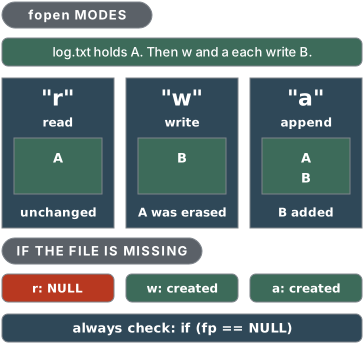
fopen takes two strings: the file name and the mode. It returns a FILE * you use from then on, or NULL if the file could not be opened.
| Mode | Meaning | If the file exists | If it does not exist |
|---|---|---|---|
"r" | read | read from the start | fopen returns NULL |
"w" | write | old contents are erased | a new file is created |
"a" | append | writing goes to the end | a new file is created |
"r+" | read and write | kept, start at the beginning | fopen returns NULL |
"w+" | read and write | old contents are erased | a new file is created |
"a+" | read and append | kept, writing goes to the end | a new file is created |
Add a b for a binary file, as in "rb" or "wb".
Always Check for NULL
fopen fails more often than you might think: the file is missing (with "r"), the name or folder is wrong, or you have no permission to write there. Using a NULL pointer with any file function usually crashes the program, so check every time:
#include <stdio.h>

int main(void) {
    FILE *fp = fopen("hello.txt", "w");

    if (fp == NULL) {
        printf("Could not open hello.txt\n");
        return 1;
    }
    fprintf(fp, "Mabuhay, BSIT!\n");
    fclose(fp);
    printf("Saved.\n");
    return 0;
}
Output on the screen: Saved.. The file hello.txt now holds one line, Mabuhay, BSIT!.
If the file cannot be opened, the program says so and stops. Here is the same check catching a missing file opened with "r":
#include <stdio.h>

int main(void) {
    FILE *fp = fopen("no_such_file.txt", "r");

    if (fp == NULL) {
        printf("Could not open no_such_file.txt\n");
        return 1;
    }
    fclose(fp);
    return 0;
}
Output: Could not open no_such_file.txt
return 1; from main tells the system the program did not finish normally. You can also call perror("hello.txt");, which prints your text followed by the system's reason, such as "No such file or directory".
fclose
fclose(fp); finishes the job: it writes out anything still waiting in the buffer and releases the file. If you forget it, the last lines you wrote may never reach the disk. Close every file you opened, and never call fclose on a NULL pointer.
Common Mistakes
- Opening with
"w"when you meant"a"."w"erases yesterday's records the moment the file opens, before you write anything. - Writing the mode as a character,
'r', instead of a string,"r". - Skipping the
NULLcheck. - Windows paths in a string need doubled backslashes:
"C:\\data\\grades.txt". A single\starts an escape sequence.
03
Formatted File I/O: fprintf() and fscanf()
You already know printf and scanf. Their file versions take a FILE * as the first argument and otherwise work the same way.
fprintf(fp, "%s %d\n", name, score);     /* write to the file   */
fscanf(fp, "%29s %d", name, &score);     /* read from the file  */
What fscanf Returns
fscanf returns the number of items it successfully read. When it reaches the end of the file before reading anything, it returns EOF (a negative constant from <stdio.h>). That return value is how you know when to stop:
while (fscanf(fp, "%29s %d", name, &score) == 2) {
    /* got a full record: use it */
}
The loop stops at the end of the file and at a badly formatted line, because either way the count is not 2.
Write, Then Read Back
The program below writes three records, closes the file, opens it again for reading, and computes the average.
#include <stdio.h>

int main(void) {
    FILE *fp;
    char name[30];
    int score, total = 0, count = 0;

    fp = fopen("scores.txt", "w");
    if (fp == NULL) {
        printf("Cannot create scores.txt\n");
        return 1;
    }
    fprintf(fp, "%s %d\n", "Ana", 88);
    fprintf(fp, "%s %d\n", "Ben", 75);
    fprintf(fp, "%s %d\n", "Carla", 93);
    fclose(fp);

    fp = fopen("scores.txt", "r");
    if (fp == NULL) {
        printf("Cannot open scores.txt\n");
        return 1;
    }
    while (fscanf(fp, "%29s %d", name, &score) == 2) {
        printf("%-6s %d\n", name, score);
        total += score;
        count++;
    }
    fclose(fp);

    printf("Average: %.2f\n", (float)total / count);
    return 0;
}
The file scores.txt now holds:
Ana 88
Ben 75
Carla 93
Output on the screen:
Ana    88
Ben    75
Carla  93
Average: 85.33
Opening the same file a second time with "r" starts reading from the beginning. That is why the program closes it after writing and opens it again.
Common Mistakes
- Forgetting
&before a number infscanf, exactly as withscanf. A string (char array) still takes no&. %sstops at a space, so a line likeAna Reyes 88readsAnaas the name and then fails onReyes. Use one-word fields, or read whole lines withfgets(two sections from now).- Looping with
while (!feof(fp)).feofonly becomes true after a read has already failed, so the last record is usually processed twice. Test the valuefscanfreturns instead.
04
Character I/O: fgetc(), fputc(), and EOF
Sometimes you want a file one character at a time, for example to count letters or lines.
fgetc(fp)returns the next character from the file, orEOFwhen there are no more.fputc(c, fp)writes one character to the file.
Store fgetc's Result in an int
fgetc returns an int, not a char. It has to: it must be able to return every possible character plus one extra value, EOF, that is different from all of them. Squeeze the result into a char and either a real character can look like EOF or EOF is never seen, depending on the system. Always declare int c;.
The Classic Reading Loop
while ((c = fgetc(fp)) != EOF) {
    /* use c */
}
Read it from the inside out: call fgetc, store the result in c, then compare c with EOF. The extra parentheses matter. Without them, c = fgetc(fp) != EOF compares first (!= runs before =), so c gets 1 or 0 instead of the character.
#include <stdio.h>
#include <ctype.h>

int main(void) {
    FILE *fp;
    int c, chars = 0, lines = 0;    /* c is an int, not a char */

    fp = fopen("motto.txt", "w");
    if (fp == NULL) {
        printf("Cannot create motto.txt\n");
        return 1;
    }
    fprintf(fp, "Code daily.\nTest often.\n");
    fclose(fp);

    fp = fopen("motto.txt", "r");
    if (fp == NULL) {
        printf("Cannot open motto.txt\n");
        return 1;
    }
    while ((c = fgetc(fp)) != EOF) {
        fputc(toupper(c), stdout);   /* stdout is a FILE * too */
        chars++;
        if (c == '\n')
            lines++;
    }
    fclose(fp);

    printf("%d characters, %d lines\n", chars, lines);
    return 0;
}
Output:
CODE DAILY.
TEST OFTEN.
24 characters, 2 lines
Each line has 11 visible characters plus its '\n', so 12 + 12 = 24 characters. Counting the '\n' characters counts the lines. Note fputc(toupper(c), stdout): stdout is a FILE * too, so fputc can write to the screen.
Common Mistakes
char c;instead ofint c;.- Missing the parentheses around
c = fgetc(fp). - Forgetting that
'\n'is a character too. It counts toward the total.
05
Line I/O: fgets() and fputs()
Most text files are made of lines, so the most useful reading function reads one line at a time.
fgets
char line[80];
fgets(line, sizeof line, fp);
fgets reads characters into line until it has read a '\n' or has filled size − 1 characters, then adds '\0'. Three things to remember:
- It keeps the
'\n'at the end of the line (if there was room for it). - It never writes past the buffer, which is why it is safe.
- It returns
NULLwhen there is nothing left to read, sowhile (fgets(...) != NULL)reads a whole file.
To remove the newline, use strcspn from <string.h>, which returns the position of the first '\n' (or the string's length if there is none): line[strcspn(line, "\n")] = '\0';.
fputs
fputs(str, fp) writes a string to the file and does not add a newline. (puts adds one when it prints to the screen; fputs does not.) Write the '\n' yourself.
#include <stdio.h>
#include <string.h>

int main(void) {
    FILE *fp;
    char line[80];
    int n = 0;

    fp = fopen("names.txt", "w");
    if (fp == NULL) {
        printf("Cannot create names.txt\n");
        return 1;
    }
    fputs("Ana Reyes\n", fp);       /* fputs adds no newline, so we */
    fputs("Ben Dela Cruz\n", fp);   /* write each \n ourselves      */
    fputs("Carla Santos\n", fp);
    fclose(fp);

    fp = fopen("names.txt", "r");
    if (fp == NULL) {
        printf("Cannot open names.txt\n");
        return 1;
    }
    while (fgets(line, sizeof line, fp) != NULL) {
        line[strcspn(line, "\n")] = '\0';    /* cut off the newline */
        n++;
        printf("%d. %s (%d characters)\n", n, line, (int)strlen(line));
    }
    fclose(fp);
    return 0;
}
Output:
1. Ana Reyes (9 characters)
2. Ben Dela Cruz (13 characters)
3. Carla Santos (12 characters)
fscanf(fp, "%s", ...) would have read "Ben Dela Cruz" as three separate words. fgets reads the full line, spaces and all. If a line is longer than the buffer, fgets returns it in pieces, so give the buffer room.
Reading a Line from the Keyboard
The keyboard is the stream stdin, so fgets(name, sizeof name, stdin); reads a full name with spaces. Never use gets: it has no size limit and was removed from the C language in C11.
Common Mistakes
- Forgetting that the
'\n'is still in the string, then wondering why a comparison withstrcmpfails. - Passing the wrong size.
sizeof lineworks only whenlineis an actual array, not a pointer parameter. - Expecting
fputsto start a new line.
06
Putting It Together: A Small Records Program
Here is everything from this lesson and Lesson 4 (Structures) in one program. Each student is a Student structure. save_student appends one record to records.txt, and list_students reads every record back and reports the average.
#include <stdio.h>

#define FILENAME "records.txt"

typedef struct {
    int   id;
    char  name[30];
    float gwa;
} Student;

/* Add one record to the end of the file. Returns 1 if it worked. */
int save_student(const Student *s) {
    FILE *fp = fopen(FILENAME, "a");

    if (fp == NULL)
        return 0;
    fprintf(fp, "%d %s %.2f\n", s->id, s->name, s->gwa);
    fclose(fp);
    return 1;
}

/* Print every record in the file and return how many there were. */
int list_students(void) {
    FILE *fp = fopen(FILENAME, "r");
    Student s;
    int count = 0;
    float total = 0;

    if (fp == NULL) {
        printf("No records yet.\n");
        return 0;
    }
    printf("%-6s %-8s %s\n", "ID", "Name", "GWA");
    while (fscanf(fp, "%d %29s %f", &s.id, s.name, &s.gwa) == 3) {
        printf("%-6d %-8s %.2f\n", s.id, s.name, s.gwa);
        total += s.gwa;
        count++;
    }
    fclose(fp);
    if (count > 0)
        printf("%d records, average GWA %.2f\n", count, total / count);
    return count;
}

int main(void) {
    Student batch[3] = {
        {1001, "Reyes", 1.75f},
        {1002, "Cruz", 2.25f},
        {1003, "Santos", 1.50f}
    };
    int i;

    remove(FILENAME);            /* start fresh for this demo */
    for (i = 0; i < 3; i++)
        if (!save_student(&batch[i]))
            printf("Could not save %s\n", batch[i].name);

    list_students();
    return 0;
}
The file records.txt holds:
1001 Reyes 1.75
1002 Cruz 2.25
1003 Santos 1.50
Output:
ID     Name     GWA
1001   Reyes    1.75
1002   Cruz     2.25
1003   Santos   1.50
3 records, average GWA 1.83
How It Fits Together
- One record per line, fields separated by spaces.
fprintfwrites the line andfscanf(... "%d %29s %f" ...) == 3reads it back. The format used to write must match the format used to read. "a"for adding,"r"for listing. Becausesave_studentuses"a", every run adds to the file.maincallsremove(FILENAME)(from<stdio.h>, it deletes a file) only so this demo starts the same way each time. Delete that line and run the program twice: you will see six records.- The functions take a pointer.
save_student(const Student *s)reads the record throughs->id, without copying the whole structure.constpromises it will not change it. - Every
fopenhas its ownNULLcheck and its ownfclose.list_studentstreats a missing file as "no records yet", which is exactly what happens on the very first run.
Limits of This Format
Names must be a single word, because %s stops at spaces. Real programs handle full names by reading lines with fgets and splitting them, or by using a separator character such as a comma. Try that in the exercises once this version makes sense.
07
Key Takeaways
- Data in variables disappears when the program ends; a file keeps it. C reaches a file through a stream, held in a
FILE *pointer. fopen(name, mode)opens a file:"r"reads,"w"creates or erases,"a"adds to the end. Always check the pointer forNULL, andfcloseevery file you open.fprintfandfscanfwork likeprintfandscanfwith aFILE *first.fscanfreturns how many items it read, so loop withwhile (fscanf(...) == 2), notwhile (!feof(fp)).fgetcreturns anint, so store it in anintand compare it withEOF;fputcwrites one character.fgets(buf, size, fp)reads one line, keeps the'\n', and returnsNULLat the end of the file.fputswrites a string without adding a newline.
08
Try It: File Handling
About files in the playground: each run happens in a fresh, empty sandbox on a server. Nothing your program writes is kept or shown to you, and there is no way to give it a file to read. So this exercise writes to stdout, the screen, which is already a FILE *. Every fprintf(out, ...) below works exactly the way it would on a real file.
Run it, then add a fourth student. On your own computer (Code::Blocks, Dev-C++, or gcc), replace stdout with an fopen call as the comment shows, check the pointer for NULL, add fclose(out); before return 0;, and open report.txt afterwards to see the same report saved.
#include <stdio.h>

/* Works with ANY stream: a file from fopen, or stdout. */
void write_report(FILE *out, const char *names[], const int scores[], int n) {
    int i;

    fprintf(out, "%-6s %s\n", "Name", "Score");
    for (i = 0; i < n; i++)
        fprintf(out, "%-6s %d\n", names[i], scores[i]);
}

int main(void) {
    const char *names[] = {"Ana", "Ben", "Carla"};
    int scores[] = {88, 75, 93};

    /* The playground keeps no files, so this writes to the screen.
       On your own computer, try instead:
       FILE *out = fopen("report.txt", "w");
       check it for NULL, and call fclose(out) at the end. */
    FILE *out = stdout;

    write_report(out, names, scores, 3);
    fputs("End of report", out);    /* fputs adds no newline... */
    fputc('\n', out);                /* ...so add one with fputc */
    return 0;
}Pro3 reviewers locked
Part of this subject's paid reviewers. Not included in this printout.
- 09Practice Exercises, Lesson 5
- 10Worked Exam Solutions + How-to-Pass Tips, Lesson 5
- 11Code Lab, Lesson 5: Report to Any Stream
Done with this module? Track it — your progress shows on the subject list.
Studying with blockmates? Send them this lesson.
Up next
Lesson 6: Recursion→←Previous: Lesson 4: Structures